
T4 Slips Explained
Every January and February, Canadian employers turn their attention to payroll year end, a busy but critical period that wraps up the previous calendar year and sets the stage for the next. In Canada, payroll year end is not just about paying bonuses or final paychecks; it is the time when employers must gather employee remuneration for the year, calculate all deductions, and then report that information to the Canada Revenue Agency (CRA) using T4 slips and T4 summaries. For Hamilton businesses, this process is especially important because the CRA tends to focus closely on payroll compliance, and errors can quickly lead to penalties or audit flags.
T4 slips matter for Hamilton employers because they are the primary way the CRA verifies that employees were paid correctly and that CPP, EI, and income tax were withheld and remitted according to the law. If your business has employees, even part time or seasonal staff, you are generally required to issue T4 slips and file a T4 summary by the CRA’s annual deadline. Missing that deadline or filing inaccurate information can trigger late filing penalties, interest charges, and even a closer look at your payroll records.
Ontario employers commonly run into issues such as incorrect SIN numbers, missed taxable benefits, mismatched payroll totals, or filing under the wrong payroll account, all of which can make CRA correspondence more complicated and stressful. Many small business owners also struggle with contractor classification, sometimes issuing T4 slips when a T4A should have been used, or vice versa, which can lead to CPP and EI problems down the road.
At Taxmetic, we support Hamilton employers with compliant, accurate payroll and year end processing, including T4 preparation, summaries, and CRA filings. Whether you run a small local shop, a growing service business, or an incorporated company in Hamilton, getting T4 slips right is a key step in staying onside with CRA while keeping your payroll obligations manageable. In this guide, we will walk you through exactly what T4 slips are, who must file them, how to complete and submit them, and how to avoid the most common mistakes that trip up Ontario employers.
What Are T4 Slips in Canada?
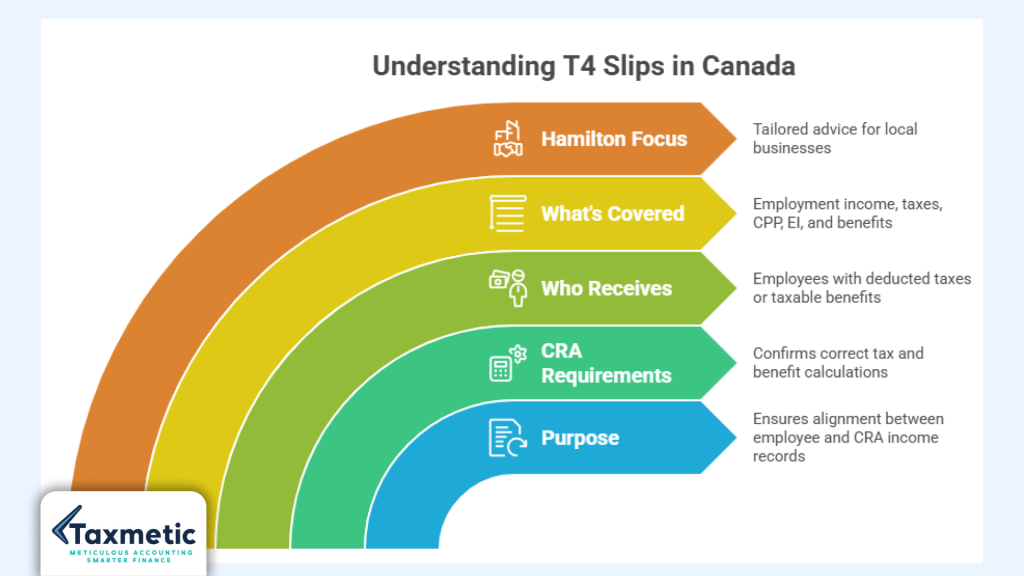
A T4 slip, officially called the Statement of Remuneration Paid, is the form Canadian employers use to report how much an employee earned in a calendar year and how much income tax, CPP, and EI was deducted from that pay. In simple terms, it is the Canada Revenue Agency’s year end record of your employee’s employment income, showing total pay, all deductions, and any taxable benefits your business provided.
Purpose of T4 slips
The main purpose of a T4 slip is to ensure that employees and the CRA see the same picture of a worker’s income and deductions for the year. Employees use their T4s when they file their personal income tax return to match their employment income with what their employer reported to the CRA. If the numbers do not match, the CRA may reassess or flag the file, which is why getting your T4s right is so important for Hamilton employers.
If you are a small business owner in Hamilton, understanding what are T4 slips and how they connect to your T1 personal tax return complete checklist for filing can help you avoid surprises when it is time to prepare your own tax return. Many of our clients who use our T1 personal tax return checklist also find it helpful to double check that their T4 numbers align with the employment income they report.
Why CRA requires T4 slips
The CRA requires employers to issue T4 slips because they are a core part of employment income reporting and payroll compliance. These slips allow the CRA to:
- Confirm that CPP contributions and EI premiums were calculated correctly.
- Verify that income tax was withheld at the proper rates and remitted on time.
- Cross check the totals on your T4 summary and payroll records to ensure everything matches.
This is where the difference between employee income reporting and payroll remittance comes into play. Payroll remittance means sending CPP, EI, and income tax to the CRA on a regular basis (usually monthly or quarterly) under your payroll account. T4 slips, on the other hand, are about reporting that same information in a summarized, year end format to the CRA and to each employee. Both are required, but they serve different timing and documentation purposes.
For Hamilton businesses that also handle HST, it helps to see T4s as the payroll year end equivalent of an HST filing: one is about remitting, the other is about reporting. If you have not already, it’s worth reviewing our guide on when do you need to register for HST in Ontario to see how payroll and sales tax obligations fit together in your business.
Who receives a T4 slip?
In Canada, an employee generally receives a T4 slip in a given year if your business:
- Deducted income tax, CPP, or EI from their pay.
- Paid more than $500 in total employment income.
- Provided taxable group benefits (such as certain group term life or health plans) that must be reported on the slip.
This includes full time, part time, and temporary employees, as long as the CRA conditions above are met. If you are a business owner who pays yourself a salary through your own corporation, you too will receive a T4 from that corporation, not a T4A, because the CRA treats that salary as employment income, not contractor or investment income.
For Hamilton business owners, this is exactly where the salary vs dividends decision matters. If you take more salary, your T4 will show higher employment income and deductions; if you take more dividends, you will see less on your T4 but more on your T5 or T5013 slips instead. Our guide on salary vs dividends: what’s best for business owners explains how this choice affects your T4 and your overall tax planning.
What T4 slips cover for Hamilton employers
From an Ontario employer’s perspective, a T4 slip is where you report:
- Employment income (Box 14 and related income fields).
- Income tax deducted from each employee’s paycheques.
- CPP contributions and EI premiums withheld.
- Any taxable benefits such as company cars, certain allowances, or group insurance benefits that must be included in the employee’s employment income.
If you are a Hamilton business owner already thinking about how to maximize small business tax deductions while keeping payroll compliant, it helps to see how your T4s line up with your overall expenses. Our article on small business tax deductions Hamilton owners miss breaks down common write offs that may not appear on your T4 but still matter for your business income.
At the same time, understanding how T4 slips Canada and Canada Revenue Agency T4 slips fit into your year end workflow can reduce the risk of CRA audit triggers. For more on how payroll errors and mismatched T4 information can raise red flags, see our breakdown of CRA audit red flags in Canada: 8 triggers.
By understanding what are T4 slips, T4 slips Canada, and Canada Revenue T4 slips, you are already taking the first step toward smoother payroll year end processing in Hamilton and across Ontario.
Who Must Issue T4 Slips?
Not every interaction with a worker triggers a T4 slip, but many common employer employee relationships in Canada do. The Canada Revenue Agency (CRA) sets clear rules about who must issue T4 slips, and for Hamilton employers, it is important to know whether your business falls into that category each year. If you pay anyone a salary, wages, or taxable benefits, there is a good chance you need to issue at least one T4, even if you consider yourself a “small business” or a one person corporation.
Businesses Required to File T4s
Small businesses
Most small businesses in Ontario that have employees, even one part time or seasonal worker, must issue T4 slips if they withhold CPP, EI, or income tax, or if the employee earns more than $500 in a year. This includes restaurants, retail shops, construction crews, salons, and service providers in Hamilton who run payroll through banks, payroll software, or an accountant.
If you are a Hamilton small business owner wondering about your overall tax obligations, our guide on small business tax deductions Hamilton owners miss explains how payroll and deductions like CPP and EI fit into your bigger tax picture.
Corporations (including professional corporations)
Any corporation that pays a salary or wage to an employee, including the owner director, must issue a T4 slip for that person. For example, if you are an incorporated business owner who pays yourself a salary instead of taking dividends, your corporation must report that pay as employment income on a T4, not on a T4A or T5.
The decision between salary vs dividends is a key part of your year end planning and directly affects how many T4 slips your corporation needs to file.
Non resident employers and remote teams
If your payroll account is in Canada but some employees live and work outside the country, you may still need to issue T4 slips if they earned employment income connected to your Canadian business. CRA rules focus on whether the income is taxable in Canada and whether CPP, EI, or tax was withheld, not simply on where the employee lives.
For Hamilton businesses that hire remote workers or have part time staff outside Ontario, it helps to understand your broader payroll year end obligations and CRA compliance rules. If you are unsure whether remote pay should be reported on a T4 or another slip, our team at Taxmetic can help you design a compliant payroll structure that fits your setup.
Employers paying a salary or taxable benefits
If you pay an employee any salary, hourly wages, bonuses, or taxable benefits, and you withhold CPP, EI, or income tax, you are generally required to issue a T4 slip. This includes:
- Regular wages and commissions.
- Severance, termination pay, and vacation pay.
- Taxable benefits such as company cars, housing allowances, or certain group insurance plans.
Minimum $500 threshold, and when T4 is still required below $500
CRA rules state that you generally need to issue a T4 slip if an employee’s remuneration exceeds $500 in a year, or if you withheld CPP, EI, or income tax from their pay, even if the total pay is under $500. In other words, if you deduct any of those three items from a worker’s pay, a T4 slip is required, regardless of the dollar amount.
You also must issue a T4 slip if you provided taxable group insurance benefits that must be reported, even if the employee’s cash pay was low or zero. This is why many small business owners in Hamilton are surprised to learn they still need T4s for part time staff or short term hires.
Exceptions and Special Cases
Not every payment to a person triggers a T4. For example, if you pay a true independent contractor for services, you usually do not withhold CPP, EI, or tax at source (unless they specifically request it), so you would normally issue a T4A slip instead of a T4, or sometimes no information slip at all. The CRA looks at factors like control, tools, risk, and integration into your business to decide whether someone is an employee or a contractor, not just what you call them on your books.
For Hamilton employers who are unsure whether a worker is an employee or a contractor, our Hamilton business owners tax planning: 5 smart moves guide includes a section on payroll classification and how misclassifying workers can create CPP, EI, and CRA penalty problems.
In some very specific situations such as certain types of fellowship or scholarship payments or certain non taxable death benefits CRA may require a different slip or no T4 at all, depending on the facts. If you are unsure whether a particular payment falls into one of these special case categories, it is wise to speak with a CPA level advisor familiar with CRA payroll compliance rather than guessing on your T4 reporting.
By understanding who must issue T4 slips and how your payroll choices affect your obligations, you can avoid last minute surprises at year end and keep your Hamilton business aligned with CRA expectations.
What Information Is Included on a T4 Slip?
A T4 slip is packed with information that the CRA uses to verify your payroll and that your employees use to file their personal tax returns. Understanding what is on a T4 slip helps Hamilton employers double check their payroll totals, avoid errors, and explain the numbers to their staff when questions come up after year end.
Key fields on a T4 slip
Employee details
At the top of the slip, your T4 includes the employee’s full name, address, and province code. This ensures the CRA links the correct employment income to the right individual, especially if the person has multiple jobs or moves between provinces partway through the year.
SIN number
The employee’s nine digit Social Insurance Number (SIN) appears on the T4 so the CRA can match the slip to their personal tax account. Typos or missing SINs are one of the most common T4 errors, so it is important to verify each employee’s SIN when you run payroll and again when you generate your T4s.
Employment income (Box 14)
Box 14 reports the employee’s total employment income for the year, including wages, salaries, bonuses, and certain taxable allowances. This is the base amount from which CPP, EI, and income tax are calculated, so any mistake in Box 14 can ripple through the rest of the slip and into the employee’s tax return.
CPP contributions and EI premiums
CPP contributions are shown in Box 16 (CPP contributions), and EI premiums are shown in Box 18 (EI premiums). These amounts reflect what you withheld from the employee’s pay and remitted to the CRA each pay period. If your payroll records show a different total than the T4, it is a red flag that something is wrong somewhere in your year end processing.
Income tax deducted
Box 22 reports the total income tax deducted from the employee’s pay over the year. This is the amount the CRA expects to see reflected in the employee’s personal tax return as tax already paid at source. If Box 22 is too high or too low because of incorrect withholding or missed bonuses, the employee may end up owing more or getting a smaller refund than expected.
Pension adjustments
If your business offers a registered pension plan (RPP) or deferred profit sharing plan (DPSP), a pension adjustment is reported on the T4, usually in Box 52. This amount reduces the employee’s room to contribute to an RRSP, so it is important to report it correctly if your workers use RRSPs or read your Hamilton business owners tax planning: 5 smart moves guide for retirement style strategies.
Taxable benefits
One of the most misunderstood parts of a T4 is the reporting of taxable benefits. These are perks or non cash items the employee receives that the CRA treats as employment income, such as:
- Company cars or auto allowances above fair market value.
- Certain group insurance benefits or life insurance coverage above the CRA threshold.
- Housing or relocation allowances that are taxable.
These amounts often appear in Box 40 or other related T4 boxes, depending on the type of benefit.
Common T4 boxes at a glance
To help Hamilton employers quickly see what each box means, here is a simple table of the most commonly used T4 fields:
| T4 Box | Meaning |
| Box 14 | Total employment income (wages, salaries, bonuses, taxable allowances) |
| Box 22 | Income tax deducted from the employee’s pay |
| Box 16 | CPP contributions withheld from the employee |
| Box 18 | EI premiums withheld from the employee |
| Box 40 | Taxable benefits provided by the employer |
Keeping this mental “map” of T4 boxes makes it easier to review your payroll data and catch errors before you file, especially if you are also watching out for CRA audit red flags related to payroll and deductions.
What Is a T4 Summary?
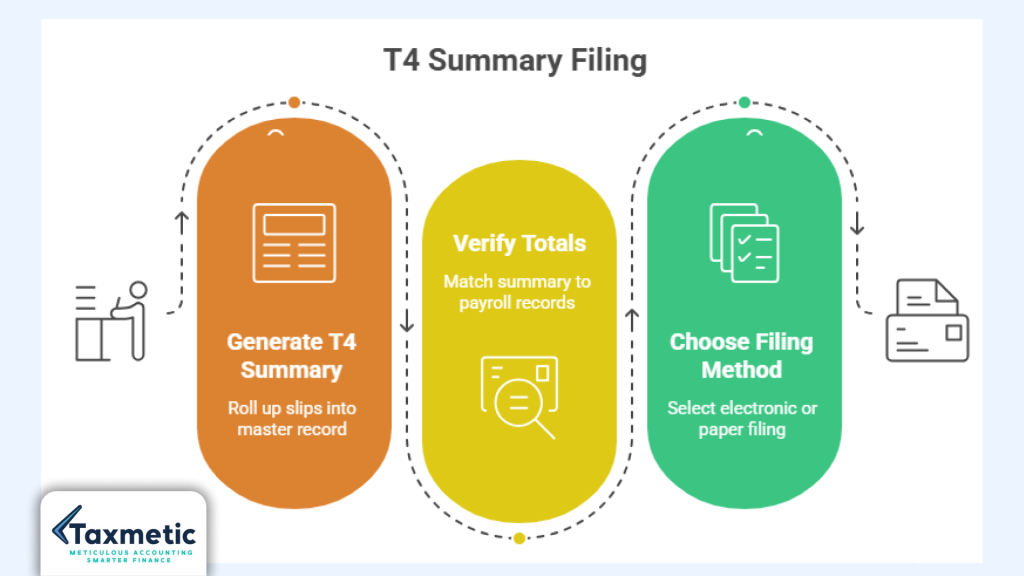
While each T4 slip shows an individual employee’s income and deductions, the T4 summary is the document that rolls up all of those slips into one master record for your business. Think of it as the CRA’s “big picture” snapshot of your total payroll for the year, capturing all employment income, CPP, EI, and income tax deducted for every employee.
Purpose of the T4 summary
The T4 summary’s main purpose is to let the CRA verify that the totals on your T4 slips match the payroll remittances and records you maintained throughout the year. Specifically, it shows:
- Total employment income for all employees.
- Total CPP contributions and EI premiums withheld.
- Total income tax deducted.
If the summary totals do not line up with how much you actually withheld and remitted, the CRA may send a letter asking for clarification or even reassess your remittances.
Relationship between T4 slips and T4 summary
Each T4 slip corresponds to one employee, and the T4 summary is simply the sum of all of those slips. For example, if you have 10 employees, you would have 10 T4 slips and one T4 summary that adds up the amounts from all 10. Your payroll software or bookkeeper usually generates the summary automatically once you finalize the T4s, but it is still your responsibility to confirm that the numbers match your payroll records.
Why totals must match payroll records
Mismatched totals are one of the most common reasons CRA sends payroll related correspondence to employers. If your T4 summary shows higher CPP or EI deductions than your payroll software shows, the CRA may assume you under remitted and ask for the difference, plus interest and penalties.
For Hamilton businesses that use software like QuickBooks, Wave, or Xero, reconciling your year end payroll reports with your T4 summary is a crucial step in avoiding these issues.
By understanding what a T4 summary is and why it matters for t4 summary CRA reporting, Hamilton employers can keep their payroll year end process smoother and more accurate.
How Do I Submit My T4 Summary to CRA?
Once you have prepared your T4 slips and generated the T4 summary, the next step is to submit your T4 summary to CRA so the agency has your official payroll data for the year. The CRA supports several filing methods, from fully electronic options to traditional paper filing for small employers who prefer a manual process.
Electronic filing methods
CRA Web Forms
CRA Web Forms is a free online tool that lets employers file up to 100 T4 slips and automatically generate a T4 summary. As you enter each employee’s data, the system calculates the totals, which reduces the risk of manual arithmetic errors.
To use CRA Web Forms, you must have a CRA My Business Account linked to your payroll program. Once logged in, you can:
- Enter T4 data for each employee online.
- Review a preview of your T4 summary before submitting.
- File the information electronically and keep a copy for your records.
This is a popular option for small Hamilton businesses that do not use payroll software or that want to cross check their accountant prepared T4s before filing.
Payroll software and XML upload
If you use payroll software such as QuickBooks, Wave, or Xero, your program can usually generate T4 slips and a T4 summary in the CRA compatible format and then upload them directly to the CRA. These systems often export your data as an XML file, which the CRA accepts for electronic filing of T4 information.
This method is especially useful for businesses with more than a few employees, because it automates calculations, reduces data entry errors, and keeps your year end filing within the same system you use for regular payroll. If you are unsure how to set up CRA ready T4 exports in your software, our full cycle bookkeeping page explains how a Hamilton bookkeeper can manage payroll year end and T4 generation for you.
Paper filing rules
If you prefer to file by paper or if your payroll is very small, you can still submit T4 slips and the T4 summary by mail. CRA’s guidance says that paper filing employers must:
- Complete all T4 slips and the T4 summary using the latest CRA forms.
- Send the original copies to CRA and keep copies for your own records.
- Include all required information so the CRA can process your return without needing to contact you.
Because paper filing is more time consuming and error prone, many Ontario employers are now moving to electronic options, especially as CRA continues to encourage digital filing for T4 type returns.
Electronic filing requirements
For T4s with 100 or more slips, CRA requires employers to file electronically unless they have obtained an exemption. This means using either CRA Web Forms (if under 100 slips) or an approved payroll software/XML channel for larger filings.
If you are a Hamilton business that is approaching or already above 100 employees, it is worth planning ahead with a payroll or bookkeeping partner who can handle your T4 preparation Hamilton needs and ensure your data is ready for electronic filing.
Filing through CRA My Business Account
To file your T4 summary electronically, you must first have a CRA My Business Account linked to your payroll program or CRA Web Forms. Once your account is set up, you can:
- Log in and navigate to the payroll or T4 section.
- Upload your XML file or complete your slips directly in Web Forms.
- View confirmation that your T4 information has been accepted.
This central account also lets you manage other CRA obligations, including remittances and filings, so it fits well with your overall employer payroll obligations in Ontario.
Paper filing vs online filing
While paper filing is still allowed, online filing offers several advantages for Hamilton employers:
- Faster processing and confirmation from the CRA.
- Built in calculations and automatic T4 summary generation.
- Reduced risk of transcription errors when entering T4 data by hand.
By understanding how do I submit my T4 summary to CRA, including the options of CRA Web Forms, payroll software, XML upload, and paper filing, Hamilton employers can choose the method that best fits their payroll size, technology, and comfort level while staying aligned with CRA expectations.
T4 Filing Deadline CRA: Important Dates Employers Must Know
Every year, the Canada Revenue Agency (CRA) sets a clear deadline for filing T4 slips and the T4 summary, and for Hamilton employers, this is the anchor of payroll year end in Ontario. CRA requires that all T4 information returns be filed by the last day of February following the calendar year to which the slips relate. For example, slips and summaries for 2025 income must be filed by February 28, 2026, even though employees may continue to receive bonus or vacation pay into early March.
Employee copy deadlines
You must also give each employee a copy of their T4 slip by the same last day of February deadline. Some employers mail paper copies; others use digital payroll or bookkeeping systems that email T4s directly to workers. Failing to provide employee copies on time can create frustration and confusion when your staff file their T1 personal tax return complete checklist for filing, even if your CRA filing is correct.
CRA filing deadlines and weekend/holiday rules
If the last day of February falls on a weekend or a statutory holiday, the CRA will still treat the last business day before the weekend or holiday as the effective deadline. This means you cannot file late simply because February 28 was a Saturday; you must file by the previous Friday or earlier. CRA’s systems are set up so that returns received after the T4 filing deadline CRA are considered late, which can trigger penalties and interest.
Late filing can trigger CRA penalties
Missing the T4 filing deadline CRA is one of the most common payroll compliance issues that Ontario employers face. If you file T4 slips and the T4 summary after the February deadline, the CRA can impose a late filing penalty based on the number of employees and the number of days you are late.
What happens if you miss the deadline?
When a business files T4 slips late, the CRA’s first response is often a penalty notice rather than an audit, but it can still sting financially. The CRA bases its penalty on:
- The number of employees covered by the T4 returns.
- The number of days (or partial days) the filing is late.
- Whether there is a pattern of late filings from the same employer.
Because the penalty scales with the number of employees, a Hamilton business with 20 staff can face a noticeably higher hit than a sole proprietor who just files for themselves. This is why proper T4 preparation Hamilton and early year end planning are so important, especially if you use payroll software or bookkeeping support.
CRA penalties for late T4 filing
CRA’s penalty structure for information returns such as T4s is designed to push employers to file on time without being overly punitive for isolated mistakes. The penalty is calculated per slip and per day, starting from March 1, up to a maximum amount set by the CRA.
For example, if you file five days late for 10 employees versus filing on time, the CRA may add a daily per employee charge that can quickly add up, especially if you have multiple payroll accounts or multiple years where you missed the T4 filing deadline CRA. Regular late filers may also attract more scrutiny, including automatic checks for other payroll related errors when they finally submit their T4s.
If you are unsure whether you can manage employer payroll obligations Ontario in house, our post on Do I need an accountant for my small business in Hamilton? explains when it pays to outsource payroll and T4 filing to a CPA level advisor.
Interest and payroll compliance risks
In addition to the direct penalty, late filing can indirectly increase your payroll compliance risk. If your T4 summary does not match your payroll remittances, CRA may reassess your CPP, EI, or income tax amounts, and interest starts running from the original due date.
For Hamilton employers who also manage HST and other tax filings, missing the T4 filing deadline, CRA can create a domino effect: more corrections, more correspondence, and more time consuming interactions with the agency. Our article on CRA audit red flags in Canada: 8 triggers explains how repeated filing delays, even for slips, can make your business more likely to be selected for a review or audit.
By understanding the T4 filing deadline CRA and treating it as a hard deadline rather than a vague guideline, Hamilton employers can protect themselves from avoidable penalties and keep their payroll year end Ontario process smooth and predictable.
T4 vs T4A: Which One Should You File?
One of the most frequent questions Hamilton employers ask is “T4 vs T4A: which one should I file?” The difference comes down to who you are paying and how you treat their work relationship, not just what you call them on your books. Getting this wrong can lead to misclassification issues, missed CPP/EI contributions, and even CRA penalties.
Key differences at a glance
| Feature | T4 (Employees) | T4A (Contractors / Other Income) |
| Who receives it | Employees (including owner directors on salary) | Contractors, retirees, pensioners, certain professionals |
| Deductions | CPP, EI, and income tax withheld at source | Usually no CPP/EI or income tax withheld at source |
| Income type | Employment income and taxable benefits | Pension, retirement, honoraria, commissions, royalties |
| Management of CPP/EI | Employer and employee both contribute via payroll | Often self managed (contractor pays both shares) |
T4 slips: Employees
A T4 slip is used for employees, including full time, part time, temporary, and even seasonal workers, as long as you withhold CPP, EI, or income tax, or they earn more than $500. This also includes business owners who pay themselves a salary through their corporation, because that salary is treated as employment income, not business income or dividends.
Some Hamilton employers mistakenly treat long term workers as “contractors” to avoid CPP and EI costs, but CRA uses specific tests such as control, tools, risk, and integration into the business to decide whether someone is truly an employee or a contractor. If CRA later decides that a worker should have been classified as an employee, you may be asked to recalculate CPP, EI, and tax for past years, plus interest and penalties.
If you are unsure whether someone on your payroll should receive a T4 or a T4A, it can help to review your broader salary vs dividends and contractor classification strategy. Our guide on salary vs dividends: what’s best for business owners includes a section on how to document worker roles so CRA sees them the way you intended.
T4A slips: Contractors and other income
A T4A slip is typically used for non employment income, such as:
- Contract or consulting fees paid to self employed individuals.
- Pension, retirement, or annuity payments.
- Honoraria, commissions, or certain professional fees that are not paid through regular payroll.
With T4A income, the payer usually does not withhold CPP, EI, or income tax at source, so the contractor or recipient manages their own contributions and instalments. This is a key CRA compliance point: if you really want to treat someone as a contractor, you should not be withholding CPP and EI like you would for an employee.
Employees vs independent contractors
CRA’s distinction between employees and independent contractors is not just about titles; it is about how the working relationship actually operates. Generally, CRA looks at factors like:
- Who controls how, when, and where the work is done.
- Who supplies tools, equipment, and workspace.
- Who bears the risk of profit or loss and has a chance to earn more by working more efficiently?
Many Ontario businesses, including Hamilton employers, misunderstand T4A vs T4 rules, especially when hiring “freelancers” or “consultants” who work on site, use company tools, and follow strict schedules. In those cases, CRA may later reclassify the worker as an employee, which means your T4A should have been a T4 after all.
If you are designing or changing your worker classification setup, it can help to review our Hamilton business owners tax planning: 5 smart moves post, which includes a brief section on structuring contractor relationships so they are defensible with CRA.
Misclassification penalties and Ontario employer risks
Misclassifying an employee as a contractor can create several risks for Hamilton employers:
- Owing back CPP and EI contributions for past years.
- Interest and penalties on missed remittances.
- Forced payroll audits or targeted reviews of your employer’s payroll obligations in Ontario.
To avoid these pitfalls, employers should document why they treat a worker as a contractor (e.g., fixed term contract, own tools, multiple clients) and then file a T4A slip for that person, not a T4. Conversely, if the worker is integrated into your business like an employee, a T4 is the right slip.
Understanding T4A vs T4 and knowing how to issue T4 Canada for true employees is a crucial step in keeping Hamilton payroll compliant and avoiding costly corrections later.
Common T4 Filing Mistakes Ontario Employers Make
Even careful Ontario employers make mistakes when preparing and filing T4 slips, especially if they are doing payroll manually or using basic software that does not fully integrate with CRA formats. Many of these errors are easy to fix once you know what to watch for, but they can still trigger CRA notices, interest, and penalties if left uncorrected.
Wrong SIN numbers and incorrect employee details
One of the most common issues is entering the wrong Social Insurance Number (SIN) or an outdated employee address. If the SIN is missing, mistyped, or belongs to the wrong person, CRA’s system may not match the T4 to the employee’s personal tax account, forcing the worker or your business to request corrections.
Keeping a clean, up to date employee master file and double checking SINs during year end can save you from this avoidable error. For Hamilton business owners who want help organizing their records, our full cycle bookkeeping page explains how a local bookkeeper can manage payroll setup and year end support.
Incorrect taxable benefits
Including or excluding taxable benefits incorrectly is another frequent T4 mistake. Examples include:
- Company cars or auto allowances that are taxable but not reported.
- Certain group insurance or life insurance benefits that exceed CRA thresholds.
- Housing or relocation allowances that should be included in employment income.
If your payroll software or bookkeeper does not flag these amounts for T4 reporting, you may end up under reporting income and deductions, which can create discrepancies with your CRA records. Our CRA audit red flags in Canada: 8 triggers article explains how incorrect taxable benefit reporting can raise unwanted attention from the agency.
Payroll totals mismatch
CRA requires that the totals on your T4 summary match your payroll records exactly, including CPP, EI, and income tax. If your summary shows higher CPP deductions than your payroll software shows, or if bonuses are missing from some T4s, the CRA may assume you under remitted and ask for the missing amounts, plus interest and penalties.
Reconciling your year end payroll reports with your T4 summary is a key step for Hamilton employers using software such as QuickBooks, Wave, or Xero. Our guide on Xero vs Wave vs QuickBooks: what’s best for Hamilton businesses? explains how to export payroll data in T4 ready formats to reduce reconciliation errors.
Missing employee slips and filing under the wrong payroll account
Sometimes employers forget to issue T4 slips for seasonal or part time staff, assuming they were not “real” employees. CRA, however, cares about whether CPP, EI, or tax was withheld or whether the employee earned more than $500, not whether you treated them as casual.
Another common issue is filing under the wrong payroll account. If you have multiple payroll programs (for example, one for a separate location or business line), CRA requires separate T4 returns for each payroll account. Combining totals from different accounts into one summary can create confusion and trigger CRA follow up.
Late submissions and incorrect province codes
Filing T4 slips and summaries after the T4 filing deadline CRA is a well known mistake that attracts penalties, as discussed earlier. In addition, some employers enter the wrong province code for an employee who moved during the year or worked remotely, which can cause CRA to route the slip to the wrong provincial office.
Practical examples of common errors
- Bonuses not included on T4s: Year end bonuses paid in March but relating to 2025 income must still be included on 2025 T4s, not left off because they came after year end.
- Auto allowance errors: Treating an auto allowance as fully non taxable when only part of it meets CRA criteria can under report taxable benefits.
- Remote employee reporting issues: Failing to update province or address codes for employees who moved out of Ontario or started working remotely from another province can create mismatches with CRA records.
Many of these payroll year end pitfalls are covered in our How Much Does an accountant cost in Hamilton, Ontario post, which also explains how professional support can help you avoid common T4 filing mistakes Ontario employers make.
Hamilton business owners who also want to maximize write offs can review our top 10 tax deductions for business owners guide to see how payroll related decisions fit into broader small business tax deductions planning.
By being aware of these common T4 filing mistakes Ontario employers make and linking your explanations directly into your existing library of guides, your Hamilton readers will naturally flow from T4 slips Canada topics to deeper coverage of employer payroll obligations Ontario and your year end support services.
How Hamilton Businesses Can Simplify T4 Preparation
For many Hamilton employers, T4 preparation Hamilton feels like a last minute scramble: exporting payroll data, double checking SIN numbers, reconciling totals, and trying to file everything before the CRA’s February deadline. The good news is that you do not have to do it all in house; there are practical ways to simplify T4 preparation while staying fully compliant with employer payroll obligations in Ontario.
Using the right tools and support lets you focus on running your business while your payroll data is clean, accurate, and ready for CRA submission. This section walks through how Hamilton businesses can streamline T4 preparation in Hamilton using payroll software, outsourced bookkeeping, year end review, CRA compliance checks, and professional payroll support through Taxmetic.
Benefits of professional payroll support
Professional payroll support, whether through a bookkeeper, accountant, or dedicated payroll service, can significantly reduce the stress and risk of T4 preparation in Hamilton. A local Hamilton provider can:
- Set up your payroll system so deductions, CPP ratios, EI premiums, and taxable benefit tracking are configured correctly from the start.
- Run year end payroll reports that flow directly into CRA ready T4s and T4 summaries.
- Handle corrections and amendments if CRA notices show discrepancies in your filings.
Avoiding CRA penalties
One of the biggest reasons to formalize your T4 preparation Hamilton process is to avoid CRA penalties and interest. Late T4s, mismatched T4 summaries, wrong SIN numbers, or misclassified workers (T4 vs T4A) can all trigger adjustment notices, reassessments, and even payroll audits.
Professional support helps you avoid these pitfalls by:
- Building in deadlines and reminders so your T4 filing deadline CRA is never missed.
- Running CRA compliance checks before you submit T4s, ensuring totals match your payroll remittances.
- Correctly classifying workers as employees or contractors so your T4A vs T4 usage is defensible.
Year end payroll preparation checklist
A clear year end payroll preparation checklist is one of the most effective ways to simplify T4 preparation Hamilton and reduce last minute surprises. In the next section you will see a detailed, step by step T4 preparation checklist for employers, but even a high level checklist helps Hamilton businesses stay organized and CRA compliant as payroll year end approaches.
Step by Step T4 Preparation Checklist for Employers
Here is a step by step T4 preparation checklist for employers that you can start using in January or as early as you feel comfortable with T4 preparation in Hamilton. This process fits well with both in house payroll and outsourced services, and it aligns with your broader employer payroll obligations in Ontario.
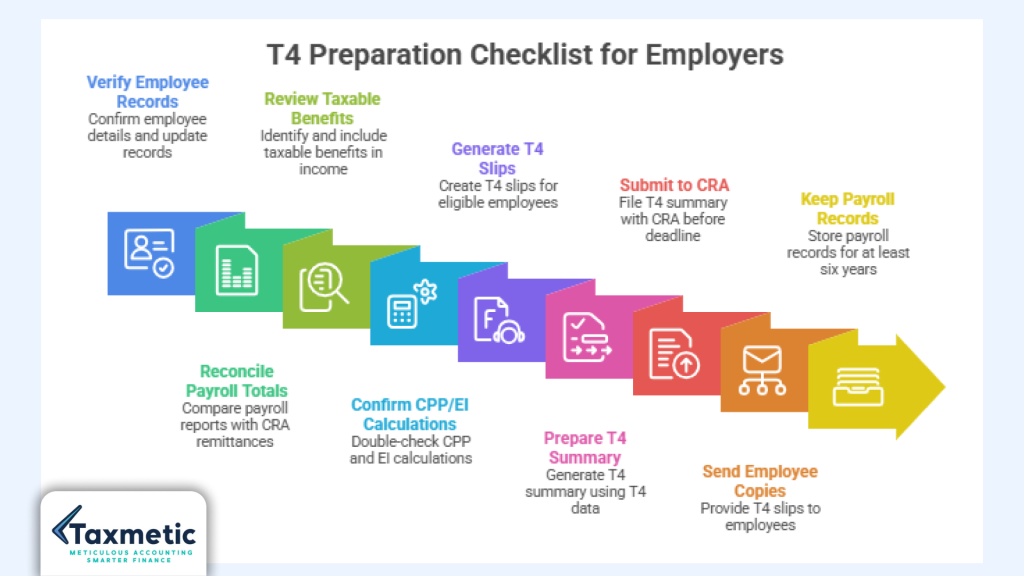
- Verify employee records
- Confirm each employee’s full name, address, province code, and Social Insurance Number (SIN).
- Update records for anyone who moved, changed their name, or started/ended employment during the year.
- Reconcile payroll totals
- Run a full year payroll report in your payroll software and compare it to your CRA remittances for CPP, EI, and income tax.
- Make sure yearly totals for wages, overtime, bonuses, and commissions match what you plan to show on T4s.
- Review taxable benefits
- Identify any taxable benefits such as company cars, auto allowances, housing, or certain group insurance benefits.
- Ensure these amounts are included in employment income and flagged in the correct T4 boxes (e.g., Box 40) before generating slips.
- Confirm CPP/EI calculations
- Double check your payroll software’s CPP ratios and maximum pensionable earnings for the year.
- Verify that EI premiums were withheld at the correct premium rate and that both employer and employee shares line up with CRA’s tables.
- Generate T4 slips
- Export or generate T4 slips for all employees who meet CRA’s criteria (e.g., more than $500 in remuneration, CPP/EI/tax withheld, or taxable benefits).
- Preview each slip to ensure Boxes 14 (employment income), 22 (income tax deducted), 16 (CPP contributions), 18 (EI premiums), and 40 (taxable benefits) are accurate.
- Prepare T4 summary
- Let your payroll software or CRA compatible tool generate the T4 summary using the final T4 data.
- Confirm that the summary totals for employment income, CPP, EI, and income tax match your payroll records exactly.
- Submit to CRA
- Choose your filing method: CRA Web Forms (for smaller employers), XML upload through payroll software, or paper filing if appropriate.
- Ensure your CRA return is submitted before the T4 filing deadline, CRA by the last day of February.
- Send employee copies
- Provide each employee’s T4 slip either by mail or through a secure digital payroll or bookkeeping portal.
- Keep a log that each slip was sent on time, in case you need to prove compliance.
- Keep payroll records
- Store all payroll records, including T4s, T4 summaries, remittance records, benefit calculations, and employment agreements, for at least six years, as required by CRA.
- If you use a bookkeeper or accountant in Hamilton, ask them to maintain both electronic and, where necessary, scanned paper copies so you can respond quickly to any CRA requests.
By following this step by step T4 preparation checklist for employers, Hamilton businesses can turn T4 preparation Hamilton from a stressful, last minute task into a smooth, repeatable process that fits neatly into your broader employer payroll obligations in Ontario and year end workflow.
Frequently Asked Questions
Q: When are T4 slips due in Canada?
Answer: T4 slips and the T4 summary must be filed with the Canada Revenue Agency by the last day of February following the calendar year to which the slips relate. This is the same T4 filing deadline CRA that applies to all employers in Ontario. You must also give each employee a copy of their T4 slip by this same date, whether you mail them or send them electronically.
Q: Can I file T4 slips online?
Answer: Yes, you can file T4 slips and the T4 summary online, and CRA strongly encourages electronic filing. Smaller employers can use CRA Web Forms to file up to 100 slips and generate their T4 summary directly within the tool. Larger employers and Hamilton businesses using payroll software like QuickBooks, Wave, or Xero can usually export an XML file and upload it directly to CRA for fully electronic submission.
Q: What happens if I file late?
Answer: If you file T4 slips or the T4 summary after the last day of February, CRA can impose a late filing penalty based on the number of slips and the number of days you are late. The penalty is calculated per slip and per day, starting from March 1, and can add up quickly for employers with multiple employees. Late filing can also create extra CRA correspondence and increase your payroll compliance risk, especially if your summary does not match your payroll records.
Q: Do contractors receive T4 slips?
Answer: Contractors usually do not receive T4 slips; instead, they often receive a T4A slip if you are reporting certain types of non employment income such as fees, commissions, or honoraria. True independent contractors are typically not subject to at source payroll deductions for CPP, EI, or income tax, so their compensation is self managed rather than handled through regular payroll. Misclassifying an employee as a contractor and issuing a T4A instead of a T4 is a common issue that can lead to CRA reassessments of CPP and EI.
Q: What is the difference between T4 and T4A?
Answer: A T4 slip is used for employees, including full time, part time, and even owner directors on salary, where you withhold CPP, EI, and income tax at source. A T4A slip is used for certain types of non employment income, such as contract or consulting fees, retirement or pension payments, and other types of reportable payments that are not paid through regular payroll. The key difference in T4A vs T4 is the nature of the relationship and whether you treat the worker as an employee or a contractor, which in turn affects CPP and EI obligations.
Q: Do I need a T4 summary?
Answer: Yes, every employer that issues T4 slips must also file a T4 summary, which is the CRA’s consolidated record of all employment income, CPP contributions, EI premiums, and income tax deducted for your employees. The T4 summary totals must match your payroll records and the combined amounts on all of your T4 slips; if they do not, CRA may ask for corrections or reassess your payroll remittances. Even small Hamilton businesses with only a few employees must complete and submit a T4 summary as part of their T4 filing deadline CRA obligations.
Q: Can I amend a T4 after filing?
Answer: Yes, you can amend a T4 slip or T4 summary after filing if you discover an error, such as a wrong SIN number, incorrect taxable benefits, or a payroll total mismatch. CRA allows you to file a corrected T4 using the same method you originally used (online, XML, or paper), and the agency will match the correction to the employee’s file. It is important to correct errors as soon as you find them, especially if the misstatement affects the employee’s refund or balance owing, since CRA may later correspond with both you and the employee if the numbers do not match.
Q: How long should payroll records be kept?
Answer: The Canada Revenue Agency generally requires employers to keep payroll records for at least six years from the end of the tax year to which they relate. This includes T4 slips, T4 summaries, remittance records, employment agreements, benefit calculations, and any supporting documentation for deductions or taxable benefits. Hamilton businesses that use full cycle bookkeeping can ask their bookkeeper to maintain these records electronically, which makes it easier to respond quickly if CRA asks for payroll information during an audit or review.
Why Choose Taxmetic for Payroll & T4 Preparation in Hamilton?
If you are a Hamilton business owner juggling payroll, year end filings, and employer payroll obligations Ontario, Taxmetic can help you turn T4 preparation Hamilton from a stressful chore into a smooth, predictable process. Our team brings local expertise rooted in Hamilton’s business environment, so we understand the unique pressures faced by small to mid sized employers in the region.
Need help preparing accurate T4 slips for your employees? Taxmetic helps Hamilton businesses stay CRA compliant with stress free payroll and year end filing support.