
Xero vs Wave vs QuickBooks: Best for Hamilton Businesses
Choosing the right accounting software is one of the most important operational decisions a Hamilton or Ontario small business can make. The platform you pick shapes how you track income, manage expenses, handle GST/HST, send invoices, and prepare for tax season. A poor fit can mean extra hours of manual work, missed tax deductions, and higher stress at year’s end, while the right tool can save you time, reduce errors, and help you grow with confidence.
Hamilton’s business landscape is increasingly digital, and more entrepreneurs are moving away from spreadsheets and paper ledgers toward cloud accounting software. Whether you run a downtown service firm, a trades business in East Hamilton, or a retail store in Stoney Creek, access to real time financial data from anywhere is no longer a luxury, it’s an expectation. Tools like Xero, Wave, and QuickBooks are now core to how Ontario small businesses operate, not just back office add ons.
In this post, we compare three leading options available in Canada:
- Xero: A modern, cloud first accounting platform aimed at growing small and medium businesses.
- Wave: A free, web based accounting solution popular with freelancers and micro businesses.
- QuickBooks (QuickBooks Online Canada): A full featured, industry standard system used by many small and mid sized businesses across Ontario.
By the end of this comparison, you’ll be able to answer questions like:
- Which system best fits your Hamilton business model and growth goals?
- Is Wave accounting good enough for your Ontario business, or do you need Xero or QuickBooks?
- How do these tools stack up on pricing, ease of use, and CRA/GST/HST compliance?
If you’re still weighing whether you even need accounting software for a small business in Hamilton, or you’re unsure whether you should work with an accountant or handle bookkeeping yourself, you may also want to review our guides on ” Do I need an accountant for my small business in Hamilton and when you should register for HST in Ontario. These posts will help you put your software choice into the bigger picture of tax planning, deductions, and CRA compliance for Ontario small businesses.
1. Overview of Cloud Accounting in Canada (2026)
Cloud accounting software refers to online accounting platforms that store your financial data securely in the cloud, accessible from any device with an internet connection. Instead of keeping files on a single computer or using offline spreadsheets, you log in to a web browser (or app) where your transactions, invoices, and reports are centralized and automatically synced across devices. For Hamilton and Ontario small businesses, this means you can approve bills on your phone at a job site, review reports from home, and give your accountant limited access without handing over physical files.
Canadian businesses are increasingly switching to cloud tools because they reduce manual work, improve accuracy, and make it easier to collaborate with accountants and bookkeepers. Many firms now offer cloud accounting services that integrate directly with tools like Xero, Wave, and QuickBooks, so your CPA can review your books in real time and offer proactive tax planning advice. This shift is especially helpful for Ontario businesses that need to stay on top of CRA deadlines, GST/HST rules, and payroll obligations without hiring a full time in house accountant.
Key requirements for Ontario businesses in 2026
For a Hamilton or Ontario small business, the right cloud accounting software should support at least the following:
- GST/HST tracking: The system should automatically calculate and track HST on sales and GST/PST on expenses where applicable, and let you generate GST/HST returns for filing with the CRA.
- CRA compliance: It should produce CRA ready reports (profit and loss, balance sheet, trial balance) and support year end tax preparation workflows for both corporate and personal tax returns.
- Payroll integration: Many Ontario businesses use integrated payroll features (or payroll add ons) so that wages, deductions, and remittances are posted directly to the general ledger, simplifying bookkeeping and reducing data entry errors.
- Multi user access: Owners, bookkeepers, and sometimes key staff need secure, role based access so teams can collaborate without overwriting each other’s data.
Choosing the best bookkeeping software for a small business in Ontario in 2026 isn’t just about saving a few bucks; it’s about aligning your system with how you actually run the business. If you’re unsure whether your current setup is scalable or CRA compliant, our post on common CRA audit red flags can help you spot risks related to poor record keeping and missing tax documentation. Equally, understanding small business tax deductions Hamilton owners often miss is easier when your accounting software reliably tracks expenses and categorizes data correctly.
In the next sections, you’ll see how Xero, Wave, and QuickBooks each meet these requirements and where they fall short so you can choose a platform that fits your Hamilton business today and supports growth as you move into the next stage of your journey.
2. Xero Overview (Xero Canada Review)
What is Xero?
Xero is a cloud based accounting platform built for small and medium sized businesses that want modern, automated bookkeeping without the jargon of traditional desktop software. In Canada, Xero has become a leading choice for Hamilton and Ontario entrepreneurs who value real time visibility into their finances, strong bank integration, and easy collaboration with accountants and bookkeepers. It is especially appealing to service based firms, trades, and growing SMEs that expect to add staff, contractors, and advisors over time.
Unlike older accounting systems that lock you to a single computer, Xero runs in your browser and syncs your bank data, invoices, and expenses in the background. This means you can check your cash flow on your phone at a job site, review financial reports from home, or invite your accountant to review your books without emailing spreadsheets back and forth.
Key features that matter for Ontario businesses
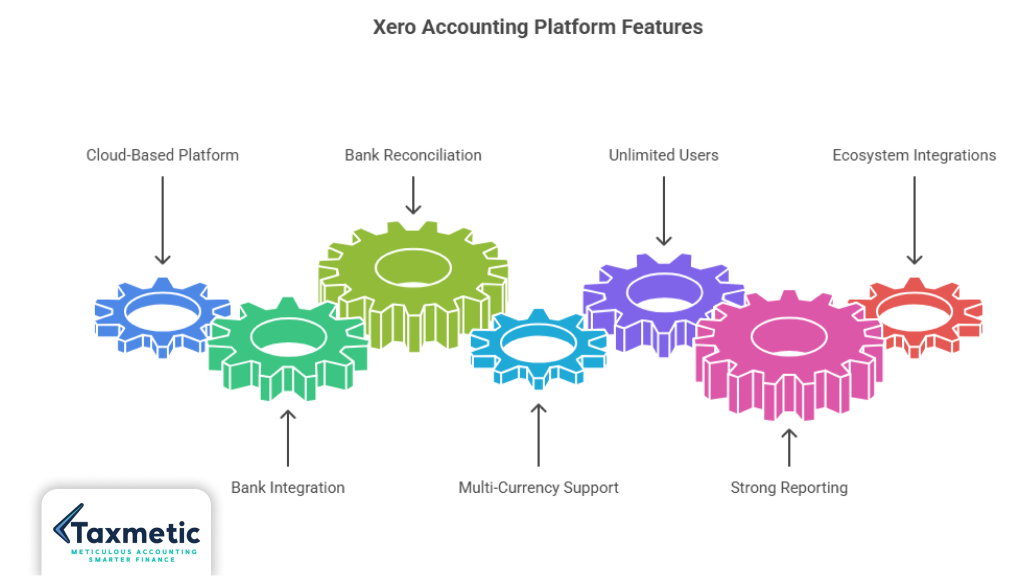
For a Hamilton or Ontario small business, several Xero features stand out as practical differentiators:
- Bank reconciliation: Xero connects directly to many Canadian banks and credit card providers, pulling daily bank feeds into the system. It then uses AI-driven suggestions and bank rules to auto match and categorize recurring transactions, which can cut hours off your monthly reconciliation time. For example, one recurring vendor or payroll item can be turned into a rule so every future transaction is coded automatically, reducing manual data entry and errors.
- Multi currency support: If your business sells to U.S. clients or works with international suppliers, Xero can track transactions in multiple currencies and handle exchange rate calculations. This is useful for Canadian exporters, consultants billing in USD, or agencies managing cross border projects.
- Unlimited users: Across all paid plans, Xero allows unlimited users, which means you can add your bookkeeper, accountant, and key staff without paying extra per seat. This is a major advantage over some competitors that charge per additional user, and it makes Xero a strong fit for multi user teams in growing businesses.
- Strong reporting and dashboards: Xero offers a range of financial reports, including profit and loss, balance sheet, cash flow statements, and aged receivables and payables. You can also build custom dashboards that show KPIs like cash flow forecasts, invoice ageing, and bill due dates, which is helpful when planning tax strategies or preparing for audits. For example, timely, clean reporting can help you avoid common CRA audit red flags related to missing or inconsistent records.
Here’s a simple snapshot of how Xero’s core features line up for a Canadian small business:
| Feature | How it helps Ontario businesses |
| Bank reconciliation | Automates matching of bank feeds and recurring transactions, saving time each month. |
| Multi currency support | Tracks USD and other currencies, simplifying cross border invoicing and expenses. |
| Unlimited users | Let’s owners, bookkeepers, and accountants collaborate without extra per user fees. |
| Cash flow forecasting | Helps you plan for tax payments, HST remittances, and payroll obligations. |
Xero’s ecosystem also includes strong integrations with Canadian payroll providers, payment processors, and practice management tools, which reduces the need to double enter data or manage multiple spreadsheets. If you’re using services such as when to register for HST or which small business tax deductions to claim, having clean, categorized data in Xero makes those conversations with your accountant much smoother.
Pros of Xero for Canadian businesses
- Modern, intuitive interface that is easy to learn for non accountants, which is ideal for busy Hamilton business owners.
- Strong CRA ready reporting and expense tracking, so you can produce accurate financial statements for corporate and personal tax returns (see our T1 personal tax return checklist for how this ties into your filings).
- Unlimited users and good collaboration tools make it straightforward to work with your accountant or bookkeeper, especially if you’re using a service like Taxmetic.
- Flexible pricing tiers that start fairly low for very small businesses and scale up as you add features like payroll, inventory, and advanced reporting.
Cons/limitations
- The entry level “Early” plan is quite restrictive, allowing only a limited number of invoices and bills per month, which many small businesses in Ontario quickly outgrow.
- Advanced budgeting and multi subsidiary reporting are either limited or require add ons or workarounds, so Xero may not be ideal for very complex corporate structures.
- Once you add payroll, projects, and higher tier plans, the total cost can rise quickly, so it is not always the cheapest option for very small or micro businesses.
Best for
- Growing SMEs in Hamilton and Ontario that need a scalable, automated system for tracking sales, expenses, and tax related data.
- Agencies and service firms that manage multiple clients, projects, or cross border work want strong reporting and collaboration.
- Multi user teams where owners, bookkeepers, accountants, and department heads all need secure access to financial data without extra per user charges.
If you’re considering Xero for your Hamilton business, pairing it with professional support can pay off. For example, understanding how much an accountant costs in Hamilton, Ontario, can help you decide whether to handle bookkeeping in house or hand it over to a trusted provider.
3. Wave Overview (Wave Accounting Free)
What is Wave accounting?
Wave is a cloud based accounting platform designed for freelancers, solopreneurs, and very small businesses that want to manage invoices and expenses without paying a monthly software fee. Unlike many paid accounting tools, Wave keeps its core accounting features free, including invoicing, income and expense tracking, and basic financial reporting. This makes it one of the few genuinely no cost options available to Canadian small businesses, which is why it has become popular among Hamilton and Ontario freelancers who are just starting or running side hustles.
Wave was founded in Toronto and is still widely used by Canadian sole proprietors and micro businesses because it handles the basics well: you can send invoices, connect to Canadian bank accounts, track GST/HST, and generate simple financial statements all without a subscription.
Why Wave is popular in Canada
Wave is especially attractive to Canadian freelancers and small service businesses because:
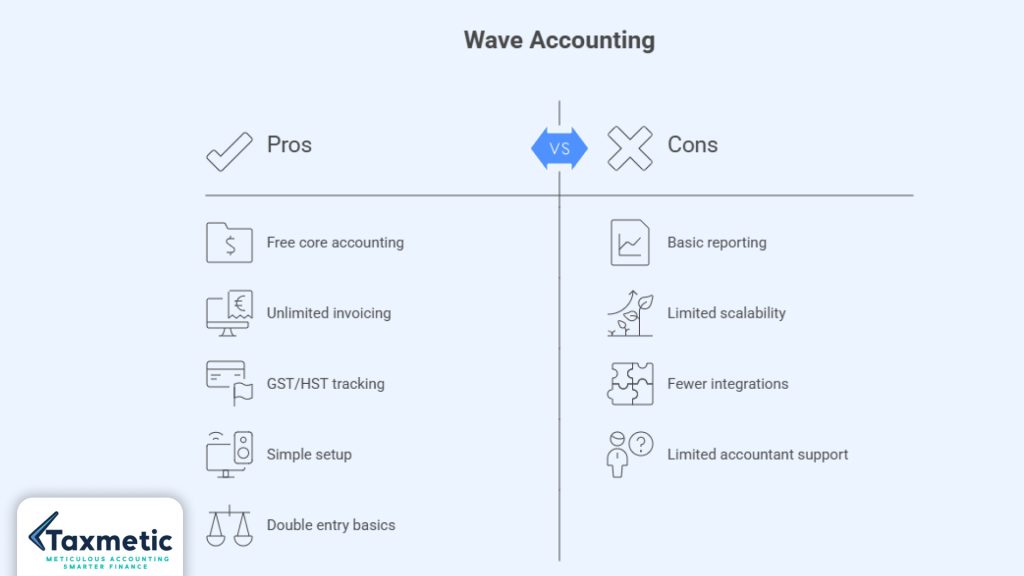
- It is free at the core: There are no monthly charges for basic accounting, invoicing, and reporting.
- It supports Canadian requirements: Wave lets you track GST/HST on sales and import bank transactions, which is enough for many small businesses that stay under the GST/HST registration threshold or only bill a handful of clients.
- It is simple to set up: Freelancers and new entrepreneurs can start tracking income and expenses in minutes without deep accounting knowledge.
Because Wave is free, it often becomes the first accounting tool Hamilton business owners try before moving to something like Xero or QuickBooks. However, its simplicity also means it is not built for complex workflows or high volume businesses.
Key features
Wave focuses on the essentials, which is why many Ontario freelancers find it “good enough” for their early stage needs:
- Free invoicing: You can create unlimited invoices, customize templates, and send reminders, all at no monthly cost.
- Basic income & expense tracking: Wave allows you to record sales, expenses, and transactions, categorize them, and attach receipts (often via mobile scanning).
- Simple dashboard: The dashboard shows basic cash flow and income and expense summaries, so you can see at a glance how much you’re bringing in and spending each month.
To help you see how Wave stacks up, here’s a quick comparison of core capabilities for a typical Ontario micro business:
| Feature | Wave does it? | Notes |
| Free core accounting | Yes | No monthly subscription for basic bookkeeping. |
| Unlimited invoicing | Yes | Use as many invoices as you need. |
| GST/HST tracking | Yes | Capture HST on invoices and expenses. |
| Bank connections | Yes | Syncs with Canadian bank accounts in many cases. |
| Financial reports | Yes | Income statement, balance sheet, and basic cash flow view. |
| Inventory management | No | Not suitable for product based businesses with stock. |
| Multi currency support | No | Less ideal for businesses with significant cross border work. |
Pros of Wave accounting free
- Zero monthly cost for core accounting if you’re comfortable with a simple setup.
- Unlimited invoices and expense tracking, which is great for service based freelancers and side hustlers.
- Easy to learn if you’re new to bookkeeping and don’t want to wrestle with complex menus.
- Double entry basics under the hood, so your books follow proper accounting standards even though the interface is simple.
Limitations
While Wave is free, it comes with several practical limits that matter as your Hamilton business grows:
- Less advanced reporting: Wave’s reporting is basic compared with Xero or QuickBooks. You may struggle to produce detailed departmental reports, multi year trends, or complex job costing views.
- Limited scalability: If your business crosses about $100,000 in revenue or starts hiring employees, Wave’s feature set often feels too thin. Many small businesses “outgrow” Wave rather than “grow into” it.
- Fewer integrations: Wave has fewer third party integrations than Xero or QuickBooks, which makes it harder to connect with inventory tools, advanced payroll providers, or e-commerce platforms.
- Limited accountant support: Many Canadian accountants and bookkeepers prefer working with Xero or QuickBooks and may refuse to use Wave, which can complicate your tax preparation and planning workflows.
Best for
- Freelancers in Hamilton and Ontario who bill clients infrequently and mainly need to track invoices, expenses, and simple cash flow.
- Side hustles or passive income streams where you want to keep costs low and reporting relatively simple.
- Micro businesses in Ontario with under a few employees, low volume sales, and no need for inventory or multi currency features.
If you’re using Wave to manage your small business, it’s still important to pair it with sound tax planning. For example, reading our posts on common CRA audit red flags and small business tax deductions Hamilton owners miss can help you stay compliant and claim everything you’re entitled to, even on a simple platform. And if you’re unsure whether you need an accountant or can handle Wave yourself, our guide on when you should work with an accountant in Hamilton can help you decide.
4. QuickBooks Overview (QuickBooks Online Canada)
What is QuickBooks Online Canada?
QuickBooks Online Canada is the Canadian version of Intuit’s widely used cloud accounting platform, designed for small and mid sized businesses that want a full featured bookkeeping system. In Hamilton and across Ontario, QuickBooks is one of the most common tools you’ll encounter, especially among retail shops, trades, service businesses, and professional firms. Many Canadian accountants and bookkeepers are trained on QuickBooks, which makes collaboration between you and your CPA relatively smooth.
Unlike free tools such as Wave, QuickBooks is built as an all in one solution that covers invoicing, expense tracking, payroll, tax ready reporting, and, in many cases, inventory and project tracking. For Hamilton businesses that expect to grow, hire staff, and work closely with an accountant, QuickBooks Online Canada is often the “safe” default choice because of its maturity, ecosystem, and widespread support.
Key features that matter for Ontario businesses
QuickBooks Online Canada offers several core features that are especially relevant for small and mid sized businesses in Ontario:
- Advanced bookkeeping system: QuickBooks handles double entry accounting, account reconciliations, and complex chart of accounts setups, making it suitable for businesses with multiple revenue streams, departments, or cost centres.
- Payroll integration: The QuickBooks Payroll add on (or linked payroll providers) records wages, deductions, and remittances directly in the accounting system, so payroll is not treated as a separate spreadsheet. This is a big time saver for Hamilton businesses that run regular payroll and need to stay on top of CRA remittances.
- Tax & GST support: QuickBooks helps you track GST/HST on sales and purchases, and it can generate GST/HST reports that align with CRA filing requirements. When paired with good record keeping, this makes it easier to prepare for remittances and annual tax returns, including those for incorporated businesses.
- Inventory management: If you run a retail store, parts shop, or any product based business in Hamilton or Ontario, QuickBooks can track inventory levels, monitor cost of goods sold, and flag low stock items, which is difficult or impossible with free tools like Wave.
Here’s a snapshot of how QuickBooks compares on core capabilities for a typical Ontario business:
| Feature | Present in QuickBooks Online Canada? | Why it matters for Hamilton businesses |
| Full double entry accounting | Yes | Supports accurate financial statements and CRA ready reports. |
| Payroll integration | Yes (via add on or linked payroll) | Simplifies wage processing and CRA remittances. |
| GST/HST tracking and reporting | Yes | Helps you stay compliant with provincial and federal tax rules. |
| Inventory tracking | Yes | Essential if you sell physical products from a Hamilton retail or trade location. |
| Multi user access | Yes (with user limits per plan) | Let’s you share access with bookkeepers and accountants. |
| Advanced reporting | Yes | Useful for growth planning, budgets, and detailed tax planning discussions. |
Pros of QuickBooks
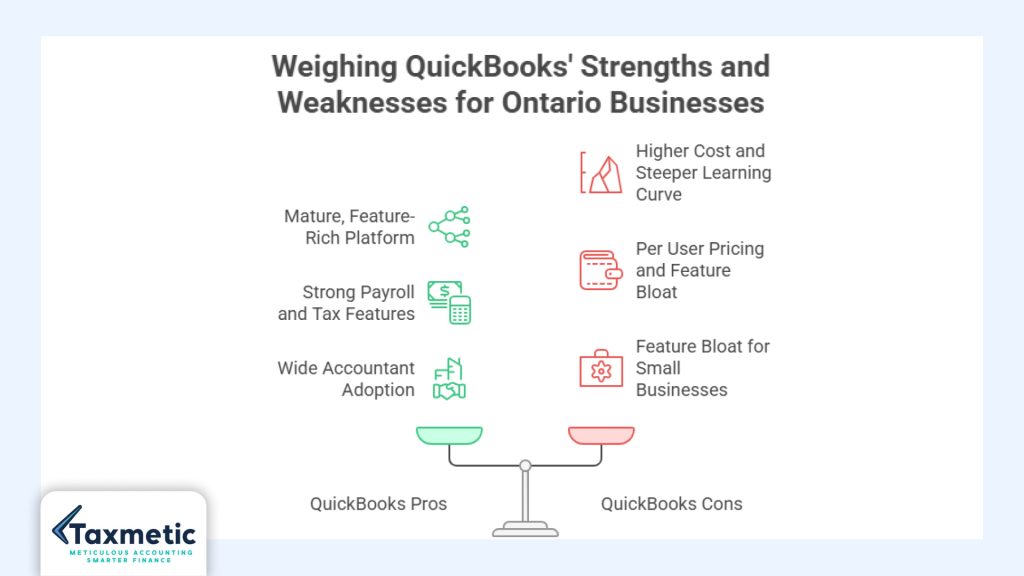
- Mature, feature rich platform that can grow with your business from a small shop to a multi location operation.
- Strong payroll and tax features that integrate directly with CRA style remittances and GST/HST calculations.
- Wide adoption by Canadian accountants, so many firms in Hamilton and Ontario are already comfortable importing and reviewing QuickBooks data.
- Solid inventory and multi user support, which is helpful for retail, trades, and service businesses that track stock or multiple projects.
From a tax planning perspective, QuickBooks’ detailed reporting can make it easier to spot deductions, track HST recoverable input tax credits, and prepare for year end reviews with your accountant. If you’re exploring options like salary vs dividends or how to incorporate a business in Hamilton, having clean, categorized QuickBooks data simplifies those conversations.
Cons of QuickBooks (cost + learning curve)
- Higher cost than Wave or basic Xero plans: QuickBooks’ pricing tiers are typically above what Wave offers for free and can exceed Xero’s entry level plans once you add payroll and advanced features.
- Steeper learning curve: QuickBooks has more menus, options, and workflows, which can be overwhelming for new entrepreneurs who just want to record invoices and expenses.
- Per user pricing on some plans: Unlike Xero’s unlimited users, some QuickBooks plans limit the number of team members you can add, which can increase costs for multi user teams.
- Feature bloat for very small businesses: If you’re a solo freelancer or micro business with low volume, you may not use many of the advanced features, so you could be paying more than you really need.
Best for
- Small to mid sized businesses in Hamilton and Ontario that need robust, scalable accounting, payroll, and tax support.
- Businesses working with accountants in Canada that rely on QuickBooks’ familiarity and strong integration with Canadian bookkeeping practices.
- Product based or retail businesses that need inventory management, multi user access, and detailed reporting for decision making.
If you’re leaning toward QuickBooks but are unsure whether you need an accountant or can handle the setup yourself, our guide on do I need an accountant for a small business in Hamilton can help you weigh the costs and benefits. Pairing QuickBooks with professional support can also help you avoid common CRA audit risks and identify missed tax deductions, as covered in our post on CRA audit red flags and small business tax deductions Hamilton owners often miss.
5. Feature Comparison Table (Xero vs Wave vs QuickBooks)
Below is a detailed but practical comparison of Xero, Wave, and QuickBooks Online Canada across the key areas that matter most to Hamilton and Ontario small businesses. This table helps you see at a glance which platform might be the best fit for your current stage and growth plans.
| Feature | Wave (Free) | Xero (Mid range) | QuickBooks Online Canada (Full feature) |
| Pricing model | Free core accounting; no monthly subscription for basic bookkeeping and invoicing. | Subscription based; three main tiers (Early, Growing, Established), typically in the mid range compared with Wave and QuickBooks. | Subscription based; higher tier pricing with more features, especially once you add payroll and advanced modules. |
| Ease of use | Very simple, minimal learning curve; ideal if you want basic accounting without menus and complex workflows. | Modern, intuitive interface; easy for non accountants once you get past the initial setup. | More feature rich and complex; powerful but can feel overwhelming for beginners. |
| Reporting & analytics | Basic reports (income statement, balance sheet, simple cash flow view); limited custom reporting. | Strong financial reports and dashboards; good for trend analysis, multi category tracking, and cash flow forecasting. | Deep reporting and advanced analytics; supports budgets, multi year comparisons, and detailed job costing reports. |
| Scalability | Best for very small businesses or freelancers; limited once you grow beyond a few employees or high volume sales. | Designed to scale with growing SMEs; handles multiple users, projects, and multi currency transactions well. | Excellent scalability for small to mid sized businesses; supports inventory, payroll, and multi user teams. |
| Integrations | Fewer third party integrations; good enough for basic bank connections and payment processors. | Large ecosystem of apps and integrations, including many Canadian focused tools (payroll, inventory, practice management). | Very broad integration ecosystem, including e commerce, payroll, and advanced accounting add ons. |
| Payroll support in Canada | No built in payroll; some third party add ons available, but limited compared with Xero and QuickBooks. | Supports integration with Canadian payroll providers; payroll is often added as a paid add on. | Strong built in payroll options (QuickBooks Payroll) or integrations; designed for Canadian remittances and CRA ready reporting. |
| CRA & tax compliance features | GST/HST tracking on invoices and expenses; basic tax ready reports; suitable for simple CRA filings. | Good GST/HST tracking and CRA ready reports; strong support for corporate and personal tax workflows. | Robust GST/HST, T4/T5, and payroll related reporting; widely used by Canadian accountants for CRA ready return preparation. |
Pricing comparison (free vs paid vs mid range)
- Wave: The core accounting software is free, which is ideal if you’re a freelancer, side hustler, or micro business with low volume. You only pay extra for add ons like payroll or payment processing.
- Xero: Mid range pricing starting at a modest monthly fee, with higher tiers that add projects, multi currency, and advanced reporting. You can scale up as your revenue grows.
- QuickBooks: Higher tier pricing, especially if you enable payroll and advanced features, but it often includes more functionality out of the box than Wave or entry level Xero.
For Hamilton businesses that are still early stage, Wave’s free model can be a great way to start while you test your business idea. If you’re planning to grow, Xero offers a good middle ground, and QuickBooks is best for more established businesses that need payroll, inventory, and deeper reporting.
Ease of use and reporting
- Wave wins on simplicity but loses on depth. It’s easy to pick up, but its reporting is basic and may not support complex tax planning or CRA style analysis.
- Xero strikes a balance between ease of use and robust reporting, making it suitable for growing businesses that want to track detailed KPIs and prepare for audits.
- QuickBooks offers the most advanced analytics and reporting, which is useful for businesses that need detailed budgets, multi year comparisons, or deep job costing views.
If you want to see how your accounting software supports overall tax planning, our guides on Hamilton business owners tax planning and when to register for HST can help you connect your platform choice with your broader tax strategy.
Scalability and integrations
- Wave is limited when it comes to scalability and integrations, which means it’s best suited to small, simple businesses.
- Xero is designed to grow with you, supporting multiple users, multi currency, and a wide range of integrations.
- QuickBooks is the most scalable option, especially for businesses that need inventory, advanced payroll, and strong integration support.
Payroll and CRA compliance
- Wave has limited payroll support, so you may need to rely on third party tools.
- Xero integrates well with Canadian payroll providers, making it easier to stay compliant with CRA requirements.
- QuickBooks offers the most robust payroll and CRA ready reporting features, which is why it’s widely used by Canadian accountants and bookkeepers.
If you’re unsure whether you need an accountant or can handle payroll and tax compliance yourself, our guide on do I need an accountant for a small business in Hamilton can help you decide.
6. Xero vs Wave vs QuickBooks: Which One Should You Choose?
Choosing between Xero, Wave, and QuickBooks often comes down to where your Hamilton business is today and where you expect it to be in the next few years. Each platform has a clear “sweet spot,” and the right choice depends on your revenue, complexity, team size, and how much you want to invest in both software and accounting support.
6.1 Choose Wave if:
- You are just starting
If you’re launching a side hustle, freelancing, or testing a small business idea in Hamilton, Wave lets you get started with real time bookkeeping at no monthly cost. You can send invoices, record basic expenses, and track GST/HST without paying a dime for core accounting. - You want a free solution.
Wave is one of the few genuinely free accounting platforms that still supports basic double entry bookkeeping and CRA style reporting. This is ideal if you’re keeping overhead low and don’t yet need payroll, inventory, or multi currency handling. - You have simple income/expense tracking.
If your business is relatively straightforward, with few clients, low volume sales, and simple expense categories, Wave’s basic dashboard and reporting are usually enough to stay organized and file your taxes. You can later export reports to an accountant or use them as the foundation for more advanced planning, such as understanding CRA audit red flags and tax deductions Hamilton business owners often miss. Wave is best for freelancers, side hustlers, and micro businesses in Ontario that don’t yet need advanced features or heavy collaboration with accountants.
6.2 Choose Xero if:
- You want modern cloud accounting.
If you prefer a sleek, browser based system that feels like a modern SaaS tool rather than an old school desktop program, Xero is a strong fit. It’s widely used by Hamilton and Ontario service based businesses that want to work from anywhere and stay connected to their financial data in real time. - You need multi user access.
Xero’s unlimited users across paid plans make it ideal for growing teams. You can invite your bookkeeper, accountant, and key staff to view or edit different areas of the system without per seat charges. This is especially helpful if you’re working with a firm like Taxmetic and want your advisor to stay on top of your books without constantly sharing files. - You want strong automation + reporting.
Xero’s bank reconciliation rules, multi currency support, and customizable dashboards make it a good choice for businesses that want to automate repetitive tasks and generate detailed reports for tax planning discussions. For example, you can use Xero reports to support decisions around salary vs dividends or when to register for HST. Xero is best for growing SMEs, agencies, and multi user teams in Hamilton and Ontario that want a modern, scalable platform that balances ease of use with advanced reporting.
6.3 Choose QuickBooks if:
- You want an all in one accounting system
If you value a single, integrated platform that can handle invoicing, expense tracking, payroll, inventory, and detailed reporting, QuickBooks is the most complete option. Many Hamilton businesses choose QuickBooks because it “does everything” in one place, which is ideal for busier, more complex operations. - You need payroll + tax features.
QuickBooks’ strong payroll and tax compliance features, including GST/HST and CRA ready reporting, make it a go to for businesses that run regular payroll and want to stay on top of remittances. This is especially important for Ontario small businesses that are already established or planning to hire staff. - You work closely with an accountant in Ontario.
Because QuickBooks is so widely used in Canada, many Hamilton and Ontario accountants are already familiar with the platform. This makes it easier to hand over your books for year end tax preparation, tax planning discussions, or incorporation advice, such as how to incorporate a business in Hamilton. QuickBooks is best for small to mid sized businesses in Ontario that need robust payroll, inventory, and multi user support, and for firms that work closely with accountants or bookkeepers.
Each platform has its place in the Hamilton business ecosystem: Wave for getting started, Xero for scaling, and QuickBooks for full scale operations. If you’re unsure which platform aligns with your growth stage and tax planning needs, our post on how much an accountant costs in Hamilton, Ontario, can help you evaluate whether to handle bookkeeping in house or with professional support.
7. Which Accounting Software Is Best for Hamilton Businesses?
Hamilton’s local economy blends service firms, trades, manufacturing, and retail, which means different types of businesses benefit from different tools. When choosing between Xero, Wave, and QuickBooks, it helps to match the platform to your specific business model.
Local business needs in Hamilton, Ontario.
- Service businesses (consultants, contractors, agencies): These firms often care about invoicing, time tracking, and simple expense management. Xero and QuickBooks are strong here, while Wave or FreshBooks can work for very small operations.
- Trades and contractors (plumbers, electricians, HVAC, builders): These businesses often need strong job costing, expense tracking, and payroll if they hire staff. QuickBooks and Xero are usually better than Wave for scale and reporting.
- Retail & product based businesses (stores, boutiques, online shops): Inventory management, sales tax tracking, and multi user access are key. QuickBooks is often the best fit; Xero can be a good alternative if you want a modern interface and strong reporting.
Best recommendation by business type
- Freelancers → Wave
If you’re a solo freelancer or side hustler with simple income and expense tracking, Wave’s free core accounting and unlimited invoicing are usually enough. It lets you keep costs low while you test your business idea and build your client base in Hamilton. - Growing startups → Xero
If you’re a Hamilton startup or early stage business planning to scale, Xero’s modern cloud accounting, unlimited users, and strong reporting make it a strong middle ground between Wave and QuickBooks. - Established businesses → QuickBooks
If you’re an established small or mid sized business in Ontario with employees, payroll, and multiple departments, QuickBooks offers the most complete, scalable solution. It is also the platform most Canadian accountants are comfortable using.
If you’re unsure whether you’re still in the “freelancer” vs “growing startup” vs “established business” stage, our post on do I need an accountant for a small business in Hamilton can help you gauge what level of support and software complexity you really need.
8. Cost Breakdown (2026 Canada Pricing Insight)
What you pay for each platform
- Wave: Core accounting and invoicing are free. You only pay extra for add ons like payroll, payment processing, or advanced reporting. This makes it the cheapest option for very small businesses or freelancers in Ontario, at least at the start.
- Xero: Mid range subscription pricing. You pay a monthly fee that rises as you add more features and higher tier plans, but the base cost is usually lower than QuickBooks for similar functionality.
- QuickBooks: Higher tier pricing, especially if you enable payroll, inventory, and multi user access. It’s the most expensive of the three but also the most feature rich.
Hidden costs (add ons, payroll, integrations)
- Payroll: Adding payroll to Wave or Xero often means paying for a linked payroll provider; QuickBooks typically bundles payroll more tightly but at a higher cost.
- Integrations: Connecting to e commerce platforms, inventory tools, or specialized add ons can add extra monthly fees.
- Accountant support: Even if you choose Wave, you may still need to pay for a CPA or bookkeeper, especially around tax time. Choosing the right accounting software can reduce your accountant’s hours and overall costs over time.
Pair this pricing insight with our guide on how much an accountant costs in Hamilton to see how software choice and professional support interact in your budget.
9. Common Mistakes When Choosing Accounting Software
- Choosing only based on price.
Picking the cheapest or free option without considering your growth stage can lead to outgrowing your tools quickly. You may end up migrating data later, which is time consuming and risky. - Ignoring scalability
Many Hamilton businesses start with Wave or QuickBooks Express but forget that as revenue, employees, or projects increase, the software must grow with them. Choosing a platform that scales with your business avoids costly overhauls later. - Not considering the accountant compatibility.
Many Canadian accountants prefer QuickBooks or Xero because they are familiar with the interface and reports. If you choose a niche or lesser used platform, you may limit your accountant options or increase their billable hours. - Not checking CRA reporting needs.
If your platform doesn’t support proper GST/HST tracking, payroll reporting, or CRA ready statements, you may face compliance issues or delays during tax season. Ensuring your software supports [CRA audit red flags] and is suitable for your business type is crucial.
If you’re making this decision in Hamilton, it helps to think beyond the software alone and consider how it fits into your overall tax planning strategy, such as Hamilton business owners’ tax planning, and when to register for HST.
10. Final Verdict: Xero vs Wave vs QuickBooks
Simple decision summary
- Choose Wave if you’re a freelancer or micro business in Ontario, need to keep costs low, and only require basic invoicing and expense tracking.
- Choose Xero if you’re a growing startup or small business that wants modern cloud accounting, unlimited users, and strong automation and reporting.
- Choose QuickBooks if you’re an established small or mid sized business that needs payroll, inventory, and deep integration with Canadian accountants.
“Best overall” recommendation by use case
- Best for simple, low cost startups: Wave.
- Best for growing Hamilton SMEs and agencies: Xero.
- Best for established businesses with payroll and inventory: QuickBooks.
Long term scalability advice
For Hamilton businesses, the key is to choose a platform that can grow with you. If you’re just starting, Wave is fine, but plan to migrate to Xero or QuickBooks within the next year or two as your revenue and complexity increase. If you’re already established, starting with QuickBooks or Xero can save you time and reduce the risk of outgrowing your software.
If you’re unsure which platform aligns with your growth stage and tax planning needs, our post on how much an accountant costs in Hamilton can help you evaluate whether to handle bookkeeping in house or with professional support.
Frequently Asked Questions:
Q: What is the best accounting software for a small business in Canada?
Answer: There is no one “best” option, but most Canadian small businesses use either Wave (for simple, low cost needs), Xero (for growing SMEs), or QuickBooks Online Canada (for established businesses with payroll and inventory).
Q: QuickBooks vs Xero: Which is better for Canadian small businesses?
Answer: QuickBooks is better if you want an all in one system with payroll, inventory, and strong CRA reporting; Xero is better if you prefer a modern, scalable platform with unlimited users and strong automation.
Q: Is Wave accounting good enough for Ontario businesses?
Answer: Wave is good enough for freelancers, side hustles, and micro businesses with simple tracking, but it often becomes too limited once you add payroll, employees, or complex reporting.
Q: Do I need accounting software for a small business in Hamilton?
Answer: Yes, most Hamilton small businesses benefit from accounting software to track income and expenses, manage GST/HST, prepare for tax season, and reduce the risk of CRA issues.
Get Expert Help With Your Accounting Software Choice
Need help choosing or setting up accounting software for your business in Ontario? Taxmetic can help you set up, manage, and optimize your bookkeeping system. From selecting the right platform, Wave, Xero, or QuickBooks, to aligning your books with tax planning strategies like salary vs dividends and Hamilton business owners’ tax planning, we’re here to guide you every step of the way.
Contact Taxmetic today to discuss which accounting software is right for your Hamilton business.